
Automatic follow-ups

Have SureBright prepare every offer and send each follow-up when it is due, through your chosen channel and within the limits you set, and follow each cart on its timeline.

Works onShopify

With automatic follow-ups on, SureBright does the work of the Carts tab for you. It prepares an offer for each abandoned cart within a few minutes and sends each follow-up when it is due, through the channel you chose for your emails. You can still open any cart to change its offer or send it sooner; see Manage carts and offers.

Send follow-ups automatically#

Follow-ups → Automatic follow-ups holds one switch, Send follow-ups automatically, and its limits.
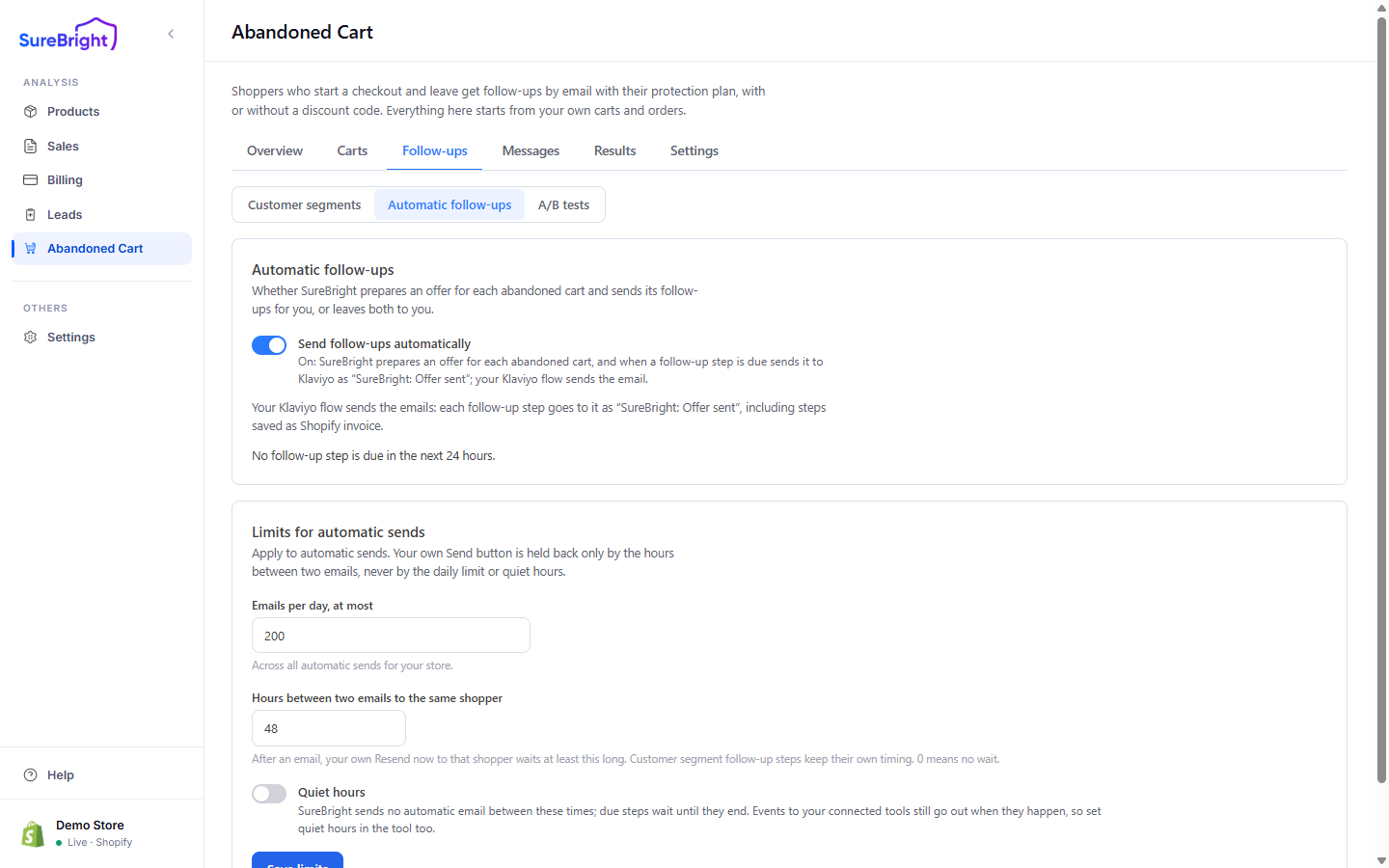
Automatic follow-ups

SwitchWhat happens
OnSureBright prepares an offer for each abandoned cart within a few minutes and sends each follow-up step when it is due, with the same checks as your Send button
OffYou prepare and send each offer yourself: Send now in the cart, or, on stores with customer segments, Send step N now on the cart's timeline

Below the switch, Last checked says when SureBright last ran for your store and how many carts it prepared, sent and recovered, and a preview counts the follow-up steps due in the next 24 hours. When nothing can go out, it says why: it is inside your quiet hours, or sending is paused by SureBright.

Offers are prepared automatically only for carts left within the hours set under Settings → Prepare offers automatically for carts left in the last (hours). Open an older cart and press Prepare offer to send it one yourself.

What gets sent#

Your storeWhat goes out
With customer segmentsEach cart follows its segment's steps, with each step's own timing, offer and message. Every cart, including All other carts, follows its segment; there is no store-wide first email or reminder. See Customer segments
Without customer segmentsA first email First email after (hours) (4 by default) after the cart counts as abandoned, with the offer from your offer rules. With One reminder before the discount code ends on (it is off by default), one more Shopify invoice email in the code's last day, to shoppers who have not bought yet

When a connected tool sends your emails, the switch reads differently: SureBright prepares the offer and hands it to the tool, and your automation there sends the email. Your tool gets offers automatically only while automatic follow-ups are on; an offer you send from a cart still goes to it. See Channels and tools.

Set the limits#

Limits for automatic sends apply only to automatic sends (press Save limits after changing them); your own Send button is held back by the gap between two emails, never by the daily limit or quiet hours.

LimitWhat it does
Emails per day, at mostAcross all automatic sends for the store. 200 by default
Hours between two emails to the same shopperThe reminder and your own Resend now wait at least this long after the previous email to that shopper. Customer segment steps keep their own timing. 0 means no wait
Quiet hours and Time zoneNo automatic email between these times; due steps wait until they end. Events to connected tools still go out when they happen, so set quiet hours in the tool too

Who can receive an offer at all, including marketing consent and addresses you never contact, is set under Settings; see Choose who can receive an offer.

Follow each cart on its timeline#

Open any cart in a segment on the Carts tab. The top of the panel shows its segment and its Follow-up sequence, and whether automatic follow-ups are on.
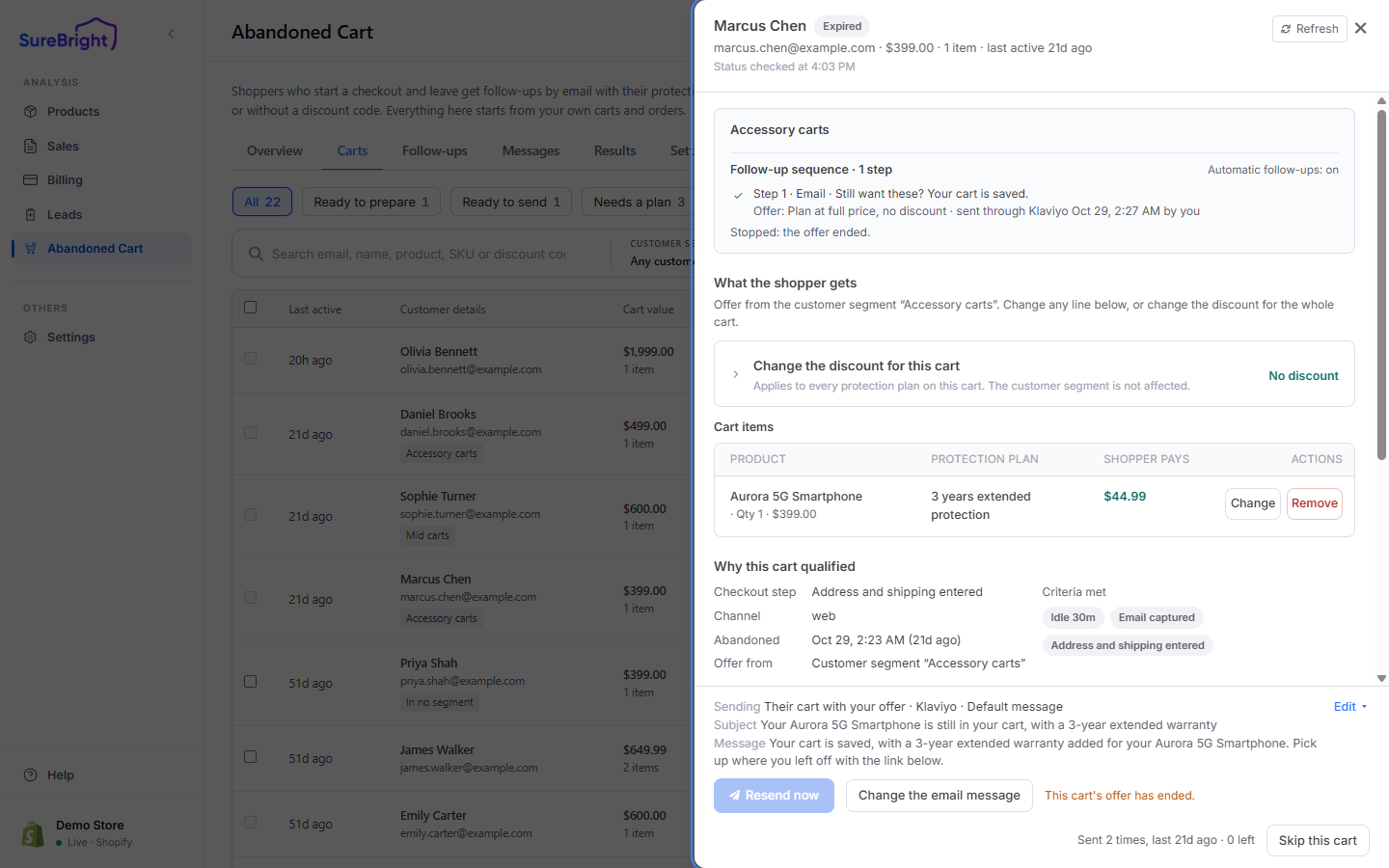
A cart's follow-up timeline

You seeWhat it means
✓ beside a stepSent. The line names the offer it carried, the tool that sent it, when, and whether you or automatic follow-ups sent it
● beside a step, and step N is next in the headingThe next step to go out. Its line says due and the time, or due now. Send step N now sends it straight away
○ beside a stepA later step, not due yet
– beside a stepSkipped, with the reason, for example the shopper has not opted in to marketing emails
Not started yetThe steps start once this cart's offer is prepared
Waiting, Held back or PausedA step is due but held for now, with the reason: Waiting: it is inside your quiet hours., Waiting: today's limit on automatic emails is reached., Held back: another email reached this shopper recently., Paused: the segment … is switched off, or Waiting: the last try did not go out, with the time of the next try. It goes out as soon as the reason clears
Stopped:The sequence is over: the shopper bought, the offer ended, you skipped the cart, or the shopper started a newer cart that carries the conversation
Control groupThe cart is held back on purpose so you can measure what the sequence adds. It is never contacted automatically. Send anyway sends to it if you choose