

Testing
Check on your SFCC storefront that shoppers see the SureBright offer on product pages, can add a plan to the cart and can check out with it.
Once everything is set up, check on your storefront that a shopper can see a plan, add it to the cart and check out with it.
What you get: confidence that the offer, cart and checkout work before you go live.
What you do: make sure the product catalogue has been exported and SureBright Product Protection is enabled on the product from the Merchant Portal, then run the checks below.
Before you start: complete the Business Manager Setup, Configuration, and Jobs phases before running tests.
See the offer on a product page#
Go to any SureBright covered Simple or Variant Product and select a variant. The SureBright offering widget appears, with the plan options to choose from.
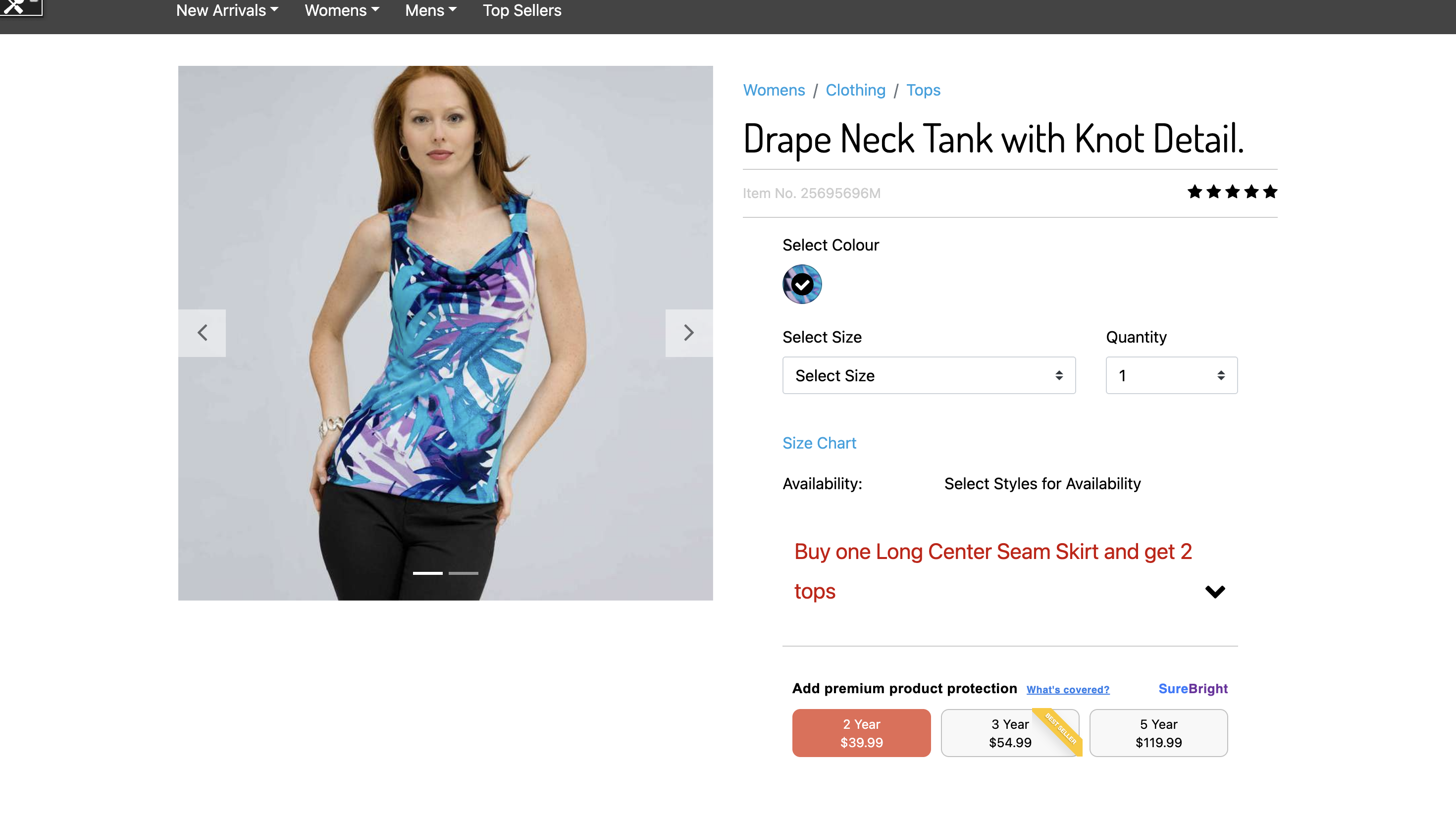
Check the product page, cart and checkout#
Run these in order on a test order. The expected result is what you should see when the integration works.
Not yet documented, so confirm with your SureBright contact before go-live: how the plan line is named and priced in the cart, whether a plan follows its product when the shopper changes quantity or removes the product, and how to keep a test order from being billed.
If a check fails, contact your SureBright representative for immediate assistance or email support@surebright.com for technical support.
Next: when every check passes, the integration is ready for production deployment. See the FAQs for any questions.